/var/www/xnett.org/ai-gpu/ops-center-mcp-ai-agents-access-control.md
[AI+GPU]Ops Center gets MCP: connect AI agents with access control
Connect compatible AI clients to 113 Ops Center tools, with explicit permissions, expiring access and human approval of changes.
- author:
- Rolf
- date:
- 2026-09-13 15:40
- read:
- ~3 min
MCP support gives Ops Center a standard way to expose its operational tools to AI clients. A compatible assistant can ask for host inventory, investigate alerts, inspect traffic observations or propose an operational change through the same application API used by Ops Center.
The practical benefit is choice: you can use an external AI client while keeping Ops Center responsible for access and execution. The existing Ops Floor agents, conversations and interface remain available.
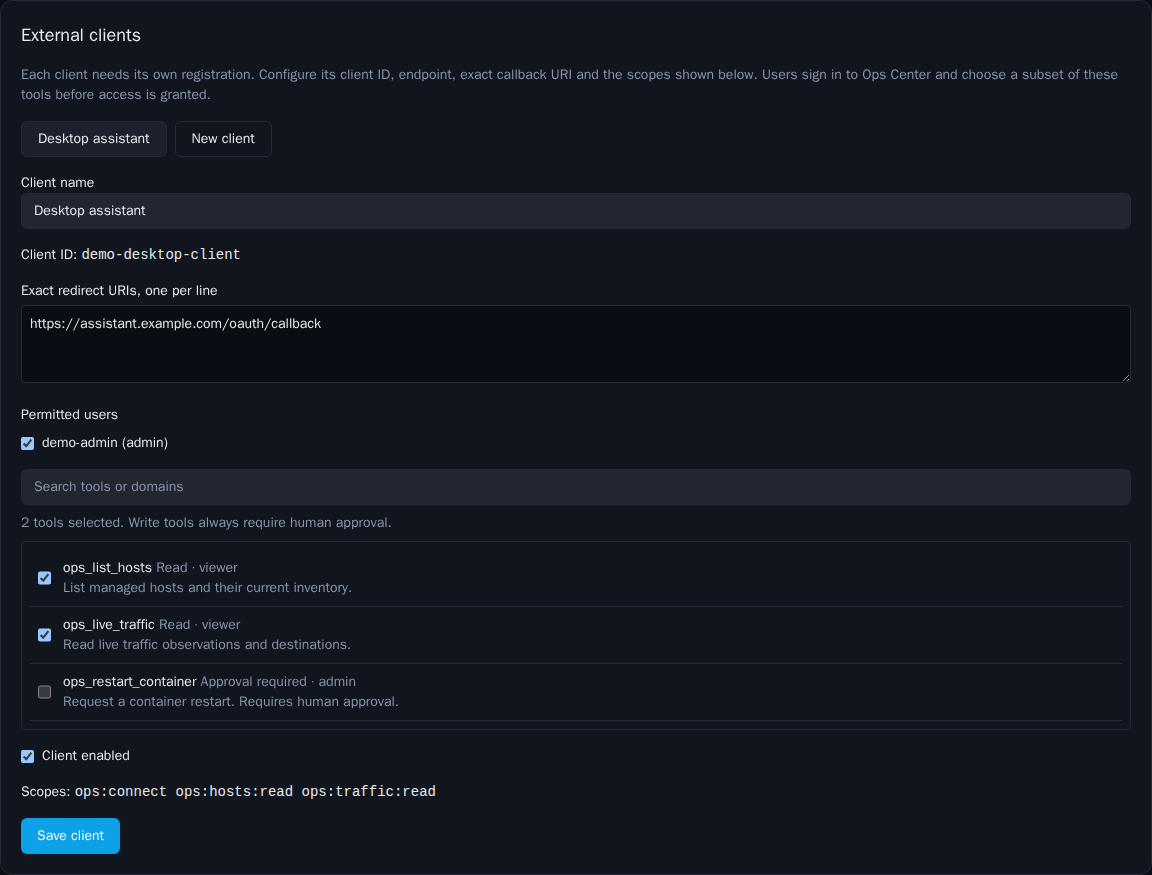
The screenshots in this article use synthetic documentation data. They do not show a live environment or installation defaults.
What connecting an agent actually means
Think of MCP as a standard tool connection. MCP access is where an administrator decides which clients and users can use that connection.
For example, a permitted assistant could receive this request:
Check the unhealthy hosts, compare their recent alerts and look for unusual traffic. Explain what the evidence supports before suggesting a change.
The assistant can call the tools it has been granted and use the results in its answer. Another person's agent can connect only if the administrator registers the client and allows that user to authorize it. Publishing the project on GitHub gives nobody access to an existing installation.
Connecting an external client does not turn it into a new character on Ops Floor. Similarly, letting Ops Center consume an unrelated external MCP server is a separate integration.
Which functions are available
This release exposes 113 reviewed operational tools spanning inventory, monitoring, logs, Traffic Map, authentication observations, patching, vulnerabilities, containers, Ansible, VPN administration, cluster status and AI operations.
Access is deliberately selective. A client that only needs monitoring can receive monitoring tools without receiving container or patching operations. New REST routes do not become MCP tools automatically.
Credential management, private VPN configurations, raw consoles and the authority to approve changes remain outside the MCP catalog. The complete tool list identifies the required role and scope for each operation.
A proposed change still needs a human decision
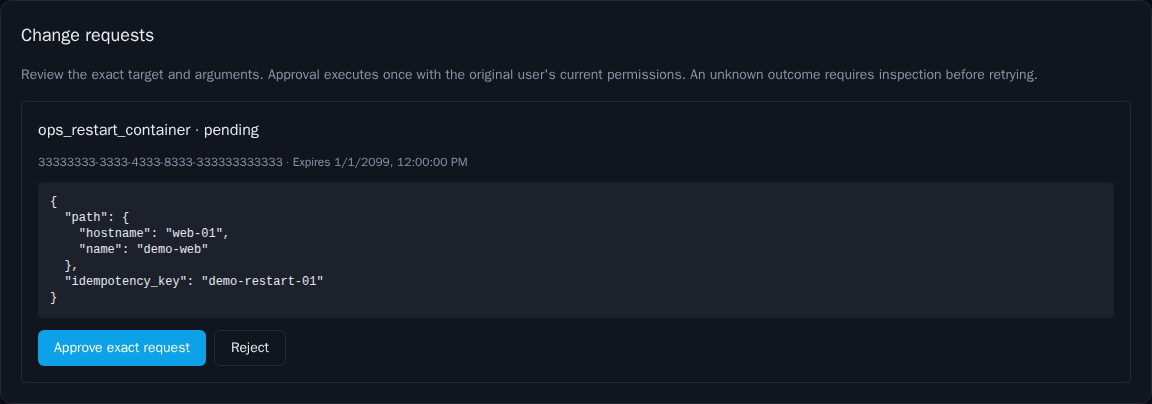
Read operations can run within the granted permissions. Operations that change state create a pending request.
The human reviewer sees the exact arguments in Ops Center before approving or rejecting the request. The model cannot approve its own work. Requests use a stable idempotency key to prevent a repeated submission from becoming an accidental second operation.
A timeout after execution begins can leave an unknown result. That requires checking the underlying job or system before trying again. A successful API response can also mean that a background job was accepted; it does not necessarily mean the infrastructure operation has finished.
The existing Ops Floor agents use it too
An administrator can grant selected MCP tools to an existing agent for a particular task owner. The worker obtains a short, task-bound credential when that agent needs to call a tool.
The grant does not replace the agent's model, memory, budget or host restrictions. Its native tools keep their existing approval rules. Scheduled tasks and the separate collaboration-board workflow are not automatically enrolled in these MCP grants.
Access grants expire after the selected duration, currently up to 30 days. Expiry stops MCP access under that grant; it does not delete the agent. There is no automatic grant renewal in this release.
Getting a client connected
Start by enabling MCP and registering the intended client in MCP access → External clients. Choose its permitted users, exact callback address and individual tools. The user then signs in and consents to the requested access.
The client must support Streamable HTTP and a pre-registered public OAuth client using PKCE S256. Automatic client registration is not enabled, so compatibility should be checked against the client's actual configuration options. Do not assume every product with an MCP label supports this login setup.
The service starts disabled, with no clients or grants. Existing installations need migration 0042 and matching API, frontend and AI worker versions. The setup guide covers endpoint routing, permissions, token expiry and troubleshooting.
MCP makes Ops Center easier to use from other AI tools while preserving a single place to decide who may do what.
More from this release
Browse the September feature series, or read the original Ops Center introduction.
# EOF