/var/www/xnett.org/infrastructure/ops-center-authentication-alerts-trusted-origins.md
[INFRASTRUCTURE]Authentication alerts in Ops Center: distinguish logins from web traffic
Review application logins, SSH authentication and WireGuard handshakes with explicit trust rules and optional Nextcloud Talk alerts.
- author:
- Rolf
- date:
- 2026-09-13 15:40
- read:
- ~3 min
A request to a website is not necessarily a login. An HTTP 200 response might be a public page, a media stream or an API response that has nothing to do with authentication.
Ops Center's authentication monitoring uses explicit signals to make that distinction. The update brings application authentication events, SSH observations and WireGuard peer handshakes into a reviewable view alongside Traffic Map.
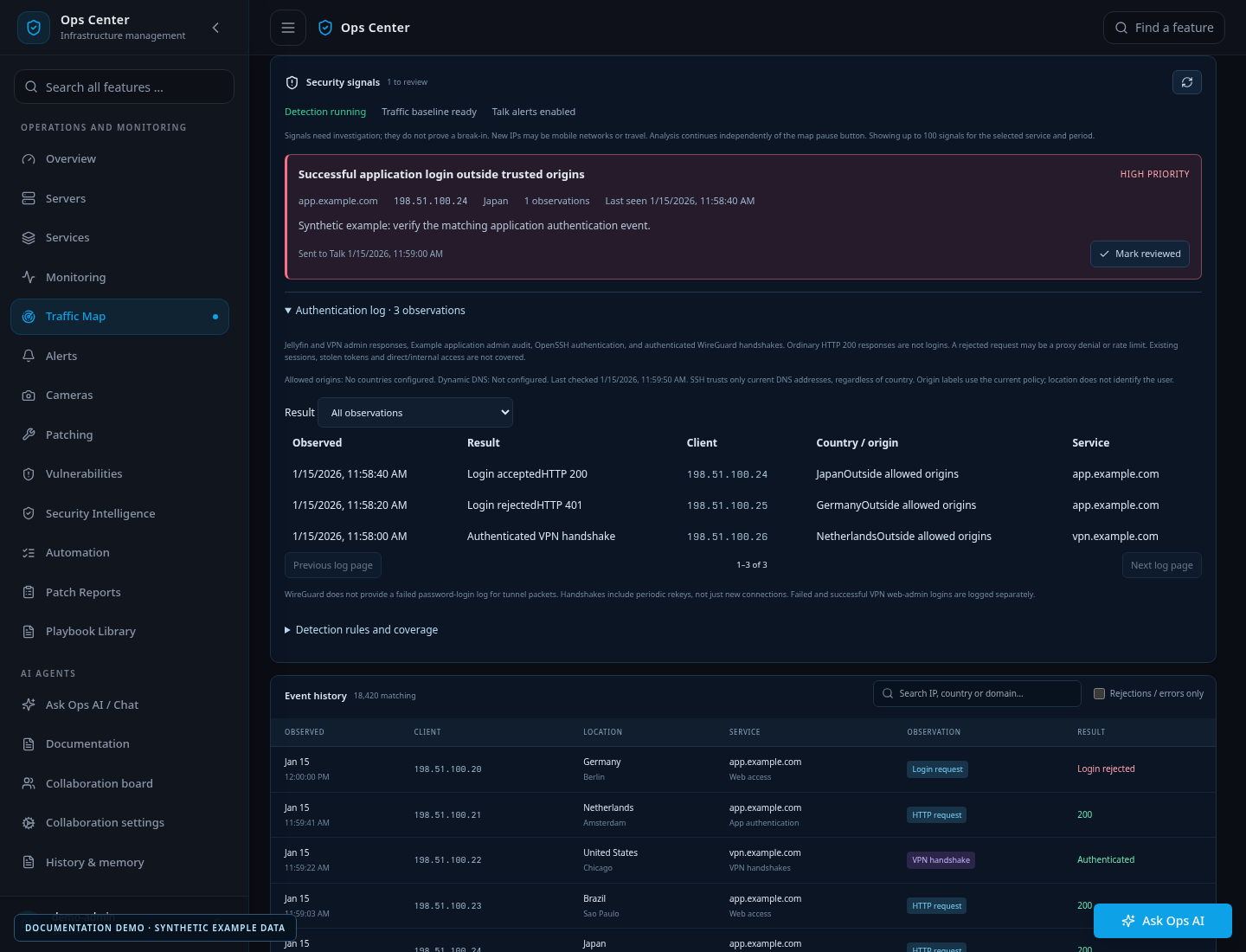
The image contains generated examples, not real users, addresses or login activity.
What counts as an authentication observation
Application audit logs provide the clearest contract. A supported application writes one JSON event after an authentication outcome, including a stable event ID, time, established client address and a success, failure or throttling signal.
The collector exports only the allowed metadata. Applications should not add passwords, tokens, session cookies, usernames or request bodies to these events.
For selected Nginx Proxy Manager sources, recognized Jellyfin or wg-easy session authentication paths can provide additional signals. The configuration must identify the application and its authentication hostnames. Generic success responses and redirects are not treated as proof of authentication.
OpenSSH observations come from the system journal. Accepted authentication is collected; failed authentication is optional per source. Connection noise before authentication is not automatically treated as a failed login.
A WireGuard handshake authenticates a peer. It does not identify a named user or imply a new interactive login each time the tunnel rekeys.
Trust rules are explicit
An administrator configures trusted countries and dynamic DNS hostnames under Settings → Traffic Map & authentication. Empty lists grant no exemptions.
The rules distinguish the source:
- Successful application authentication and VPN handshakes outside trusted countries or current trusted DNS addresses produce high-priority alerts.
- Failed application logins produce warnings even when they come from a trusted origin.
- SSH uses the current public addresses of configured trusted DNS names. A trusted country does not exempt SSH authentication.
Unknown GeoIP results and failed DNS lookups do not silently grant trust. DNS exemptions are refreshed, and stale exemptions are removed when resolution fails.
These rules create investigation signals. They do not automatically block an address or prove that an account was compromised.
Keep important observations visible
A compact authentication banner appears above Traffic Map in the normal interface and wallboard. It can be minimized and scrolls with the page.
The banner updates independently of map filters and pause state. It shows recent observations and unreviewed authentication alerts, so narrowing the map to one source does not hide the separate authentication summary.
For example, an unexpected successful SSH authentication deserves a different response from a burst of failed application attempts. Review the time, source and trusted-origin configuration, then correlate the observation with host and application logs before drawing a conclusion.
Optional notifications through Nextcloud Talk
Operators with a configured Talk integration can enable authentication notifications separately from aggregate traffic digests. High-priority notices can be delivered without waiting for the aggregate digest interval.
Delivery depends on collection, analysis and network availability. Pending notices are retained for retry, and delivery failures are visible. This is not a guaranteed real-time alerting service.
The integration uses an explicitly configured HTTPS backend and existing bot credentials. Notification setup is opt-in; a fresh installation does not contact somebody else's server.
Fit the feature to the application
The most reliable setup starts at the application's authentication boundary: emit a success only after authentication has actually succeeded, and establish the client address using the application's trusted proxy configuration.
Then onboard the source, verify collection health and test the expected success and failure signals. A traffic log alone cannot supply details that the application never recorded.
Read the authentication rules and audit contract for exact formats and supported readers. The Traffic Map article explains filtering, history and collection status.
More from this release
Browse the September feature series, or read the original Ops Center introduction.
# EOF