/var/www/xnett.org/infrastructure/ops-center-traffic-map-live-history.md
[INFRASTRUCTURE]Traffic Map in Ops Center: live observations with useful history
Follow traffic observations across your services, filter by source and investigate historical activity without relying on a live map alone.
- author:
- Rolf
- date:
- 2026-09-13 15:40
- read:
- ~3 min
Traffic Map now combines a live view of observed activity with persistent history. It helps answer questions such as which services received traffic, where public client addresses were approximately located and whether an unusual pattern appeared across several sources.
The map is backed by collected log and authentication metadata. It is not a packet capture system, a firewall or a complete record of every network connection.
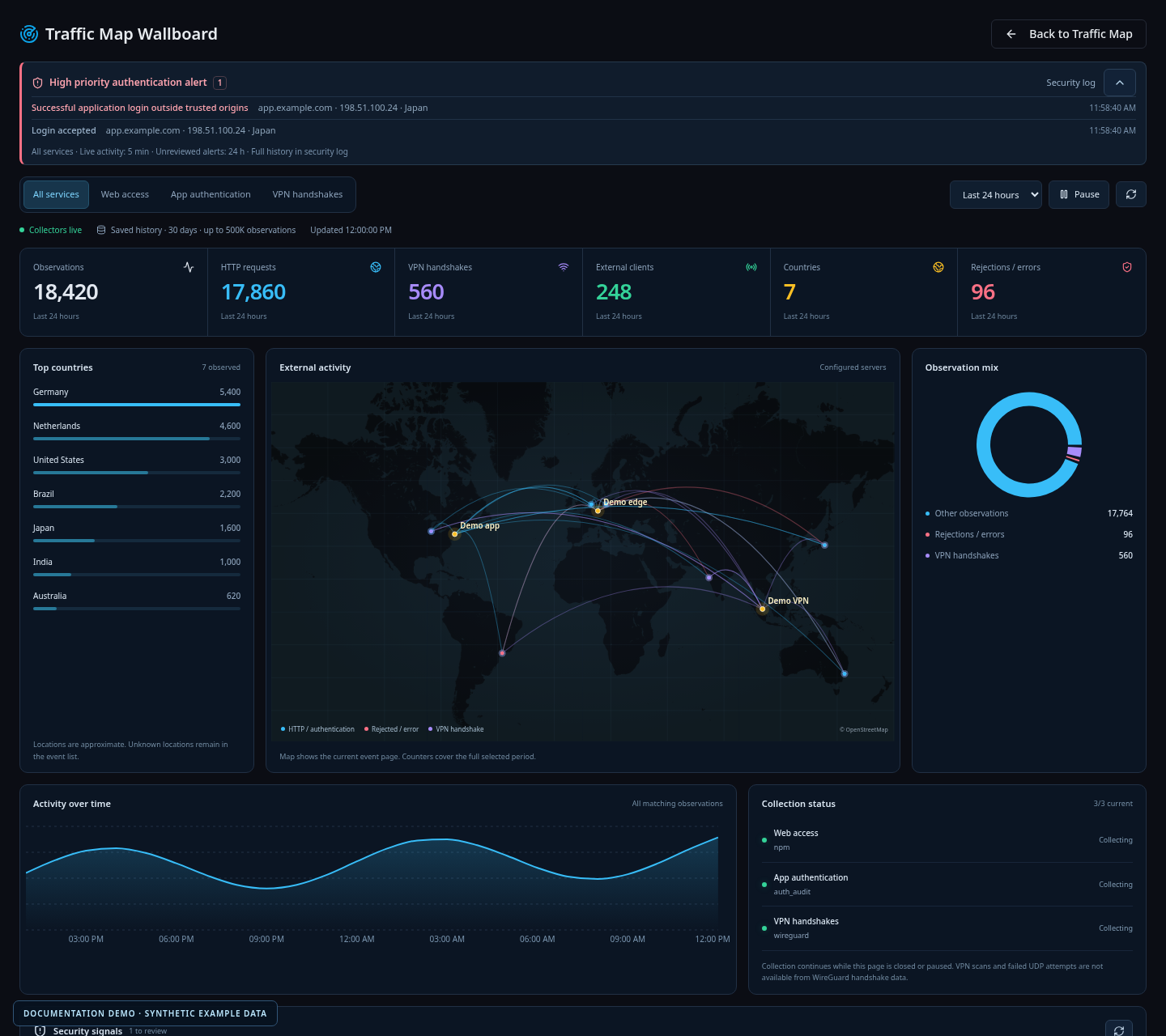
All displayed addresses, hosts and events are documentation examples, unrelated to a live deployment.
Start with the sources you actually operate
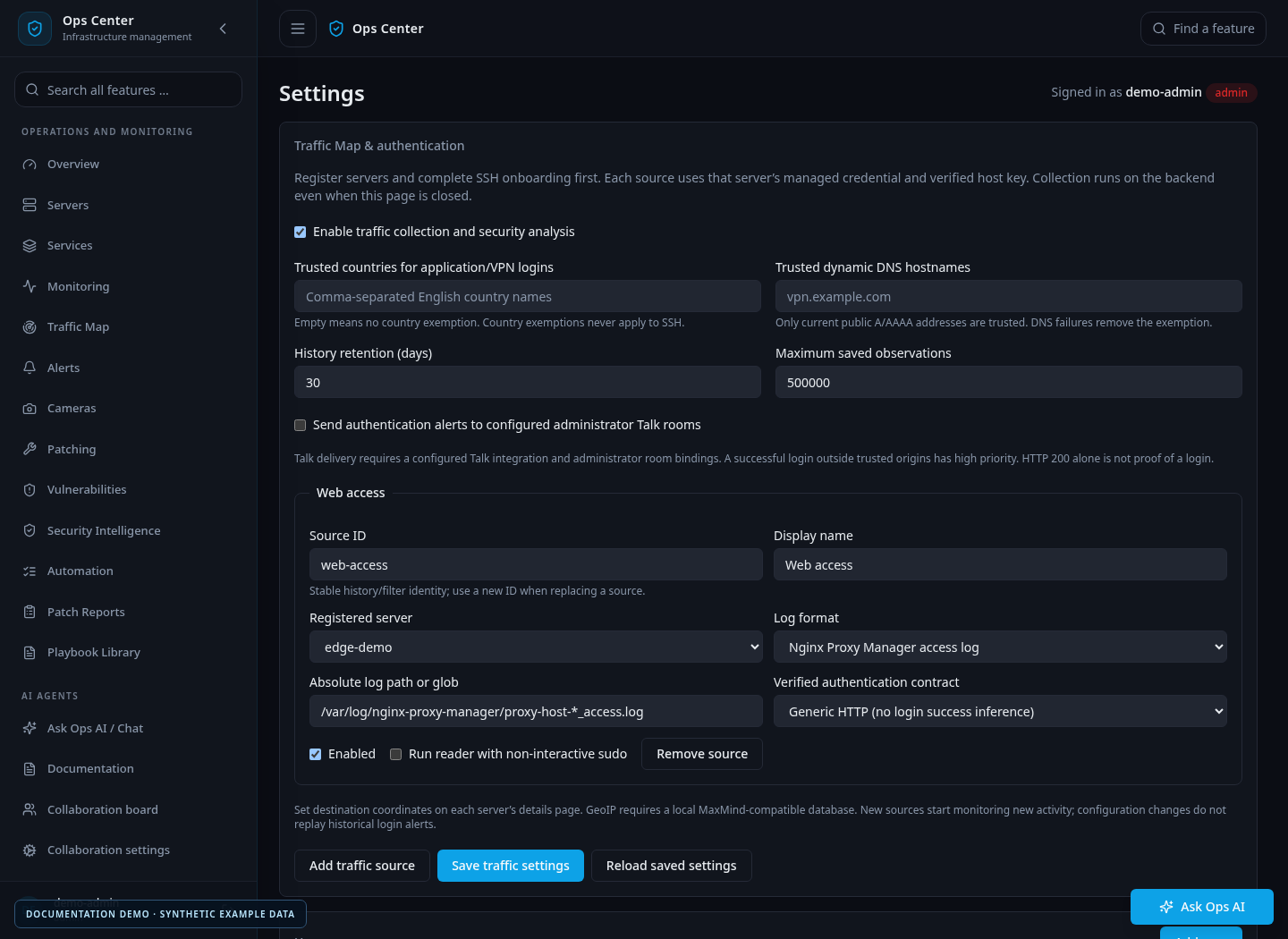
Sources are configured under Settings → Traffic Map & authentication. Each source refers to a server already onboarded in Ops Center, with managed SSH credentials and a verified host fingerprint.
The supported readers cover:
- Nginx Proxy Manager access logs.
- Caddy JSON access logs.
- Application authentication events in JSONL format.
- OpenSSH authentication from the system journal.
- WireGuard peer handshakes.
Choose the reader, actual log path or interface, and a stable source ID. Labels make the source understandable in filters; the ID connects it to history and collection checkpoints.
New installations start with collection disabled and no configured sources. Operators supply their own hosts, paths and trust rules. Later changes in Settings apply without rebuilding the application.
Follow activity and investigate a time window
The interface brings together source filters, a timeline, country and domain summaries, collection health and a dedicated wallboard.
A useful investigation might start with an alert on a public service. Select that source, narrow the time window and compare the observed origins and activity with other services. Persistent history means the investigation can continue after the event has passed or the browser has closed.
A quiet map is only meaningful if collection is healthy. Collection status exposes problems such as missing credentials, changed SSH keys or unreadable logs. Those conditions should be investigated before concluding that no traffic arrived.
Locations are approximate evidence
Client locations come from a local, compatible GeoIP database that the operator provides. Collected IP addresses are not sent to an external geolocation API. Server destination coordinates are entered on the server record.
Unknown locations stay unknown. Nginx Proxy Manager and Caddy readers discard non-public client addresses, while the SSH and application audit readers can retain private addresses for local investigations.
A country marker does not identify a person or establish malicious intent. VPN exits, proxies and outdated GeoIP information all affect what a location can tell you.
The browser uses OpenStreetMap tiles for the basemap, so it still contacts a public tile service. Traffic observations and history remain available if map tiles are unavailable.
History has explicit limits
Observations are stored in PostgreSQL. Default retention is 30 days with a 500,000-row limit, and both are configurable within the supported ranges. Cleanup is periodic; retention is separate from backup policy.
Stored fields include time, client IP, approximate location, source, hostname, status and classified signal. Request bodies, paths, query strings, usernames, keys and cookies are not stored in traffic history.
Collector checkpoints and deduplication support retries. In a multi-node deployment, database coordination prevents simultaneous commits for the same source. A newly configured source starts with arriving activity rather than replaying historical login events as fresh alerts.
Traffic and authentication answer different questions
An HTTP success code tells you about a request. It does not, by itself, establish that somebody logged in. Ops Center keeps that distinction in its authentication readers and rules.
The companion article on authentication observations and alerts explains which signals count and how trusted origins affect notifications.
For upgrades, apply migrations through 0041 for configurable traffic settings, or through 0042 when also installing the MCP release. Record existing source and trust settings before upgrading: legacy environment-specific values are not automatically imported. The Traffic Map guide provides the complete setup and reader contracts.
More from this release
Browse the September feature series, or read the original Ops Center introduction.
# EOF